Hue Reference
A hue in Ultima Online is a 1-based index into the client’s hues.mul file.
Every colored item, creature, and piece of clothing carries a hue number; the
client looks that number up to decide how to recolor a sprite.
The important thing to understand is that a hue is not a flat tint. Each hue is a 32-shade gradient — a ramp from shadow to highlight. When the client draws a hued sprite, it walks the sprite’s own grayscale shadow→highlight ramp and remaps each gray level to the matching shade of the hue’s gradient. A near- black pixel becomes the hue’s darkest shade; a near-white pixel becomes its lightest. That is why a single grayscale ingot sprite can become nine visibly different metals while keeping all of its shading and depth.
This remapping is also why this wiki bakes hues directly into PNGs rather than
using CSS filter or a color overlay: a CSS tint multiplies a flat color across
the whole image and flattens the shading, which cannot reproduce a 32-step palette
remap. We read the gradient out of hues.mul and recolor the sprite pixel-by-pixel,
exactly as the client does.
(Hue 0 is the special “unhued” value — it means “draw the sprite as-is,” so it
has no gradient entry of its own.)
The full palette
Section titled “The full palette”Below is every hue in hues.mul, drawn as a grid of small swatches. Each swatch
shows a representative mid-tone from that hue’s 32-shade gradient. Gridlines mark
every 8 columns and rows for orientation. Reading left-to-right, top-to-bottom,
the first swatch is game hue 1.
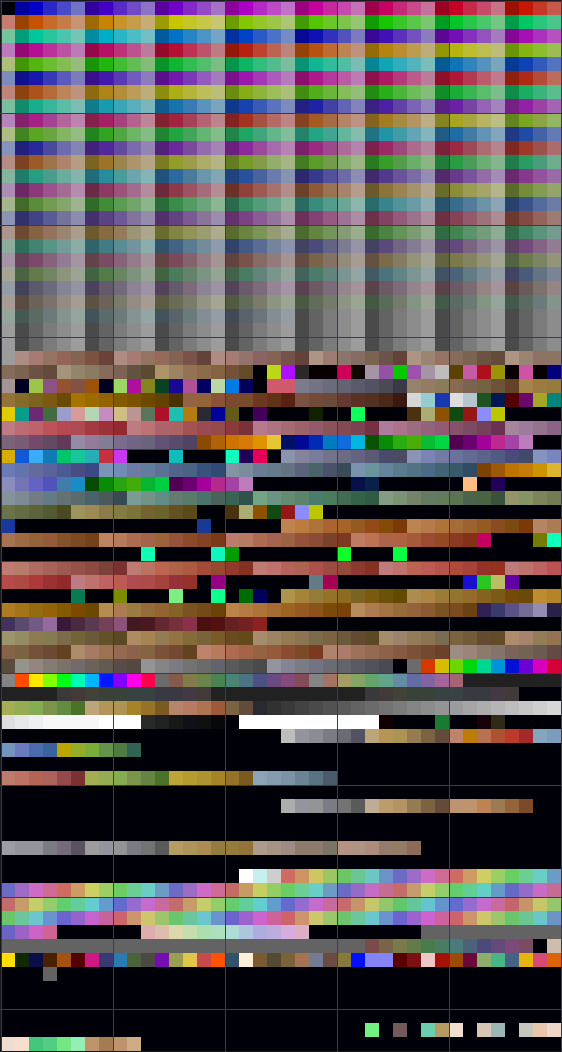
All 3000 hues in hues.mul, one mid-tone swatch each (40 per row).
Notable hues
Section titled “Notable hues”These are the craft-resource hues defined in
ServUO’s ResourceInfo.cs — the colors the
crafting system applies to metals, leather, dragon scales, and wood. Each swatch
shows the full 32-shade gradient (shadow at top, highlight at bottom).
Metals
Section titled “Metals”| Swatch | Hue (hex) | Hue (dec) | Name |
|---|---|---|---|
 | 0x0973 | 2419 | Dull Copper |
 | 0x0966 | 2406 | Shadow Iron |
 | 0x096D | 2413 | Copper |
 | 0x0972 | 2418 | Bronze |
 | 0x08A5 | 2213 | Gold |
 | 0x0979 | 2425 | Agapite |
 | 0x089F | 2207 | Verite |
 | 0x08AB | 2219 | Valorite |
Leather
Section titled “Leather”| Swatch | Hue (hex) | Hue (dec) | Name |
|---|---|---|---|
 | 0x0283 | 643 | Spined |
 | 0x0227 | 551 | Horned |
 | 0x01C1 | 449 | Barbed |
Dragon scales
Section titled “Dragon scales”| Swatch | Hue (hex) | Hue (dec) | Name |
|---|---|---|---|
 | 0x066D | 1645 | Red Scales |
 | 0x08A8 | 2216 | Yellow Scales |
 | 0x0455 | 1109 | Black Scales |
 | 0x0851 | 2129 | Green Scales |
 | 0x08FD | 2301 | White Scales |
 | 0x08B0 | 2224 | Blue Scales |
| Swatch | Hue (hex) | Hue (dec) | Name |
|---|---|---|---|
 | 0x07DA | 2010 | Oak |
 | 0x04A7 | 1191 | Ash |
 | 0x04A8 | 1192 | Yew |
 | 0x04A9 | 1193 | Heartwood |
 | 0x04AA | 1194 | Bloodwood |
 | 0x047F | 1151 | Frostwood |
Same sprite, every metal
Section titled “Same sprite, every metal”Every ingot color uses the same grayscale art (item 0x1BF2). The only thing
that changes is the hue. Below is that one sprite, drawn nine times — plain Iron
plus the eight colored metals — to show how the remap turns one piece of art into
nine distinct ingots:


Iron, Dull Copper, Shadow Iron, Copper, Bronze, Gold, Agapite, Verite, Valorite — one sprite, nine hues.
To see where these resources come from and how they’re used, visit the Resources gathering guide and the Resources item catalog.