User Interface (Gumps)
이 콘텐츠는 아직 번역되지 않았습니다.
Almost everything you do in Ultima Online happens through small on-screen windows called gumps. A gump is any UI panel the client draws from the game’s gump art — your status bar, a health bar, the paperdoll, an open container, your spellbook, the skill list, a shopkeeper’s stock, a sign you read. This page is a tour of the windows you will use most as a new player and what every field on them means.
The pictures below are built from the client’s own gump art with example values overlaid, so they show the same chrome you see in-game.
What is a “gump”?
Section titled “What is a “gump”?”A gump is a draggable client window. They share a common behaviour:
- Open — most gumps open by double-clicking the thing they belong to (double-click yourself for the paperdoll, a backpack for its contents, a spellbook to read it) or via a hotkey/menu.
- Move — drag a gump by its frame to reposition it. The client remembers where you left the persistent ones (status bar, paperdoll) between sessions.
- Close — right-click a gump to close it. Containers also close when you walk out of range.
- Stack — you can have many gumps open at once; clicking one brings it to the front.
A few gumps are interactive surfaces rather than fixed pictures — the paperdoll is composited from your body plus each worn item, and the skill list is a parchment scroll you can stretch taller. Those are noted below.
The status bar
Section titled “The status bar”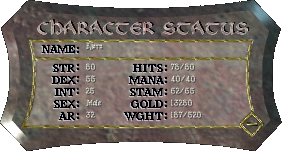
The status bar is your character’s vital-signs panel. The compact classic
window (gump 0x0802, shown above) lays its fields out in two columns:
Left column
- Name — your character’s name.
- STR (Strength) — raises your maximum Hit Points and how much you can carry, and gates heavy weapons and armour.
- DEX (Dexterity) — raises maximum Stamina and your attack speed.
- INT (Intelligence) — raises maximum Mana.
- Sex — your character’s gender (Male/Female); on the expanded view this sits alongside race.
- AR (Armor Rating) — your physical-damage resistance from worn armour. On the expanded/modern status window this is the first of the five resistances (Physical, Fire, Cold, Poison, Energy), each shown as current/max.
Right column
- HITS — current / maximum Hit Points. Reaching 0 kills you. Maximum scales with Strength.
- MANA — current / maximum Mana, the fuel for spells and some special moves. Maximum scales with Intelligence; mana regenerates faster while meditating.
- STAM — current / maximum Stamina. Drains as you act and run; at 0 you cannot run and swing slower. Maximum scales with Dexterity.
- GOLD — coins carried in your backpack.
- WGHT (Weight) — current / maximum carry weight. Going over the maximum makes you overweight: you slow down and eventually cannot move.
The small padlock icons next to STR/DEX/INT are stat locks — click to cycle each stat between raise (↑), lower (↓) and locked (—), which controls which stats may change as you train.
The expanded status window adds more: the five resistances, Followers (used / maximum control slots for pets), Luck, weapon Damage, Stat Cap, and combat ratings. See Character & Stats for what each number does and how it grows on this shard.
Health bars
Section titled “Health bars”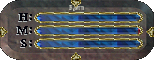
A health bar is the small three-line gump (self bar = gump 0x0803) that
shows a creature’s Hits, Stamina and Mana as bars rather than numbers. You can
open one for:
- Yourself — a movable readout you can park anywhere on screen.
- Your pets — open a bar for each tamed creature to watch its health in a fight and to issue commands. See Taming & Pets.
- Other players and monsters — single-click a target and drag to pop out its bar.
The bar fills proportionally to current ÷ maximum. Colour communicates state:
- Green / blue — healthy; the filled portion is the remaining amount.
- Grey (greyed out) — the creature is dead, out of range, or hidden, so the reading is stale.
- Yellow — invulnerable/blessed (cannot be harmed).
- Poisoned — the bar turns the poison colour to warn that the target is taking poison damage.
Other players’ bars are also tinted by notoriety (innocent, criminal, enemy, etc.). For how that drives combat, see Combat Basics.
The paperdoll
Section titled “The paperdoll”The paperdoll is the head-to-toe portrait of your character that opens when you double-click yourself. It doubles as your equipment screen: every item you wear is shown worn, and you can drag items on and off it. It is not a single picture — the client composites it from a nude body plus one gump per equipped item, drawn in slot order and tinted by each item’s hue.
For the full breakdown of how the paperdoll is assembled (and a gallery of outfits), see the Paperdoll reference.
Backpack & containers
Section titled “Backpack & containers”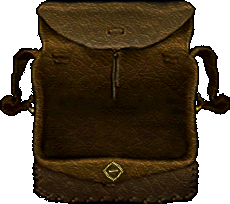
Double-clicking your backpack opens a container gump (default backpack =
gump 0x003C, shown above). Containers are how UO stores everything:
- Items sit at free positions inside the window — drag to pick up, drop onto the window to put back, drop onto another container to move between them.
- Nesting — containers can hold other containers (a pouch inside your backpack, a chest inside a bank box), each opening into its own gump.
- Weight — every item has a weight; the contents of your pack count toward the WGHT figure on your status bar. Bags-of-holding and the bank box have their own item/weight limits.
- Stacking — identical commodities (gold, reagents, ingots) stack into a single pile with a quantity.
For picking up, equipping, the bank box, and what survives death, see Items & Inventory.
Spellbook & skill list
Section titled “Spellbook & skill list”Spellbook
Section titled “Spellbook”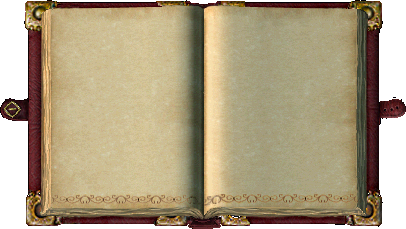
Double-click a spellbook to open it (the magery book is gump 0x08AC). Each
spell you have scribed appears as a small icon on the book’s pages; the circle
buttons down the spine flip between spell circles. To cast, double-click a
spell’s icon (or use a spell hotkey), then aim with the targeting cursor.
Casting needs the right Magery skill, enough Mana, and the spell’s
reagents in your pack. See Spellcasting for
the full casting flow, fizzles, and disruption.
Skill list
Section titled “Skill list”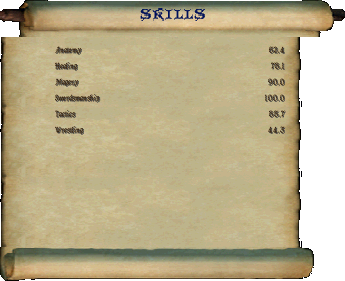
The skill list is the parchment scroll (built from the expandable scroll
gump 0x1F40–0x1F43) that lists every skill and your current value out of
100.0. From it you can:
- Use an active skill — double-click a skill whose name is highlighted as usable (Hiding, Animal Lore, Anatomy, Detect Hidden, etc.) to invoke it, then target if it asks.
- Drag a skill out to make a one-click button on screen.
- Set skill locks — the small arrow next to each skill cycles raise (↑) / lower (↓) / locked (—), governing which skills gain or give up points as you approach your total skill cap.
You can stretch the scroll taller by dragging its bottom edge to show more rows. See Using & Training Skills for how skills rise with use and the caps on this shard.
Gumps in general & targeting
Section titled “Gumps in general & targeting”Many actions are two-step: you invoke something (cast a spell, use a skill, click a craft, choose “loot”), the client shows a targeting cursor, and you then click what the action applies to. While the targeting cursor is up:
- click a target to apply the action;
- press Escape (or right-click) to cancel;
- shortcuts let you re-use your last target or target yourself without clicking.
This invoke-then-target pattern underlies casting, healing, taming, crafting, and looting alike. See Targeting for the cursor, the last-target / target-self shortcuts, and range rules.